Course participants with nothing to install
The instructor uploads a ZIP with the course material. That turns into a fully configured cloud IDE, and participants open the lesson in their browser and start coding straight away, with the right package versions and the data already in place.
Starting point
Anyone who has taught a programming course knows the first half hour: a package will not install, the language version is wrong, something behaves differently on Windows than on macOS, and somebody's corporate firewall blocks the download. In a live format with many participants at once, that eats exactly the part of the session people came for.
Goal
Participants should open a lesson and start writing code. No setup, no installation, and it should not matter what runs on their own machine.
Most of the constraints come from Posit Workbench underneath, along with a commercial licence that has to be installed per server.
Solution
For the instructor there is not much to it. They upload a ZIP to a lesson or a webinar, containing the course material plus a small configuration file: R or Python or both, which versions, which system packages, which setup steps, which IDE extensions. A background job takes over from there, and its status stays visible in the platform's admin area until the environment is reachable. For webinars a small preview server is created as well, so they can check beforehand that everything looks the way they intended.
For participants there is even less to it. They open the lesson, there is no second login, and after a brief loading screen with a progress indicator they are sitting in a running Positron session already open in the course folder. On first access their account and home directory are created in the background and their own copy of the course files is put in place. Whatever they change in it survives a session restart.
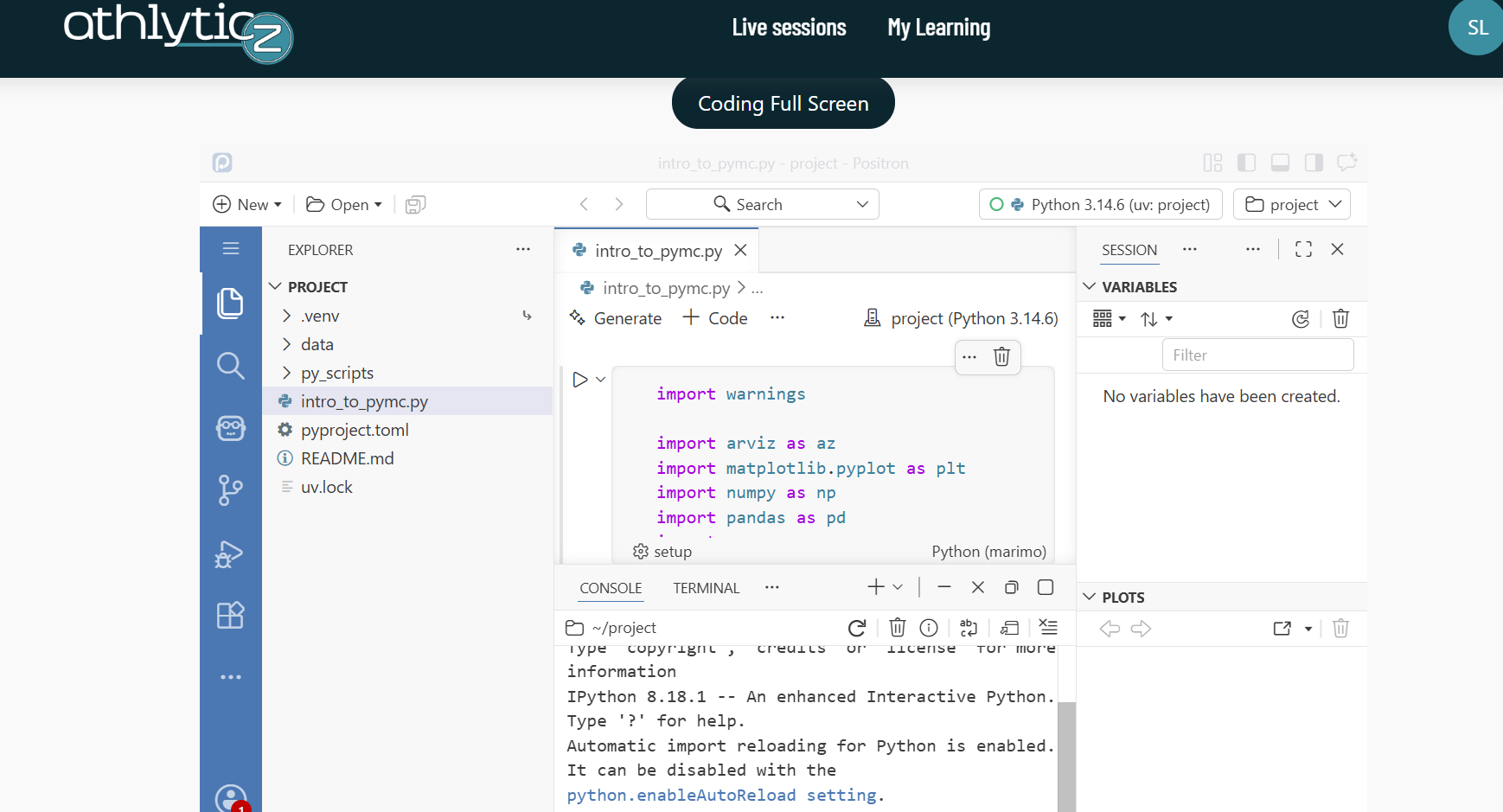
Outcome
Where it got tricky
One built environment for hundreds of separate home directories
Workbench creates a separate Linux user with their own home for every participant. The obvious route, installing the packages as root at build time, fails silently: the usual installation paths of the R and Python toolchains end up inside root's home and are not readable by the session users. That only shows up at runtime, mid-course, as “permission denied” or a missing package. The second obvious route, giving everyone their own environment, duplicates several gigabytes per person and is not viable for a live course. So the environment sits exactly once outside all homes, readable by everyone and writable by nobody; only the course material is copied.
Configuration that never reaches the session
Sessions are started by the Job Launcher through PAM, bypassing the container entrypoint. So the basic assumption that environment variables set in the Dockerfile will be present in the session no longer holds. The awkward part is that nothing fails. The session starts, R just cannot find its library and the Python console never comes up. Unpleasant to debug, because the same configuration looks perfectly correct from a shell inside the container.
Landing straight in a running IDE, in an iframe, cross-site
After login, Workbench normally shows a project overview, and a freshly started session takes a moment before it can be used. For a course both are useless. On top of that the IDE runs embedded on a different domain, where current browsers' cookie defaults break the login flow. Simply proxying through and redirecting ends in a redirect loop, an empty iframe or rejected session requests, depending on the state. So the proxy completes the login server-side, triggers the session start itself and covers the wait with a loading page of its own.
Technical implementation
Three layers, cleanly separated. The build runs once per bundle: download, hash, check against the registry, unpack, validate the configuration, generate a Dockerfile from it, build, push to a private registry. The image tag is a hash of the bundle, the platform configs and the generator version, so it is content-addressed: two identical bundles produce the same tag and are not built twice, and a change to the generator automatically invalidates the old images.
The deploy creates one VM per server, which uses cloud-init to install a reverse proxy with automatic TLS, pull the image and bind the container to localhost only. After that a DNS record is set and polled until an HTTPS probe succeeds. Only then does the deploy count as finished, and that is a far more reliable criterion than “the container is running”. Three server types with their own lifetimes: lesson, preview for 24 hours, and webinar slots that appear an hour and a half before the session and disappear an hour and a half after it.
At runtime there is a custom auth proxy in Node at the front, then Workbench, then the Job Launcher, then one Positron session per participant. The proxy is the only place that establishes identity: it discards any identity headers it receives and sets them itself from a token the learning platform signed.
Reproducibility is the real payoff of building it this way. The base image is pinned to a specific
release, uv to a fixed version, the R version comes from the course configuration, R
packages from the renv lockfile and Python packages from the uv lockfile
in frozen mode. A course that runs today runs the same way next term.
Hosting and ongoing work
From upload to reachable URL there is no manual step. A cron job picks up new bundles. If one fails, the full output of the failed command is attached to its record and readable in the admin area, and the run carries on for the others. Preview and webinar servers clean themselves up again, DNS record included. If that gets interrupted partway through, the job simply runs again.
There is real isolation between participants: their own Linux account, their own home, and permissions on the parent directory set so nobody can list anyone else's name. A resource profile caps memory and processes per person, so one participant's infinite loop does not ruin the session for everyone.