Official statistics in, a finished presentation out
Consultants pick a location, a few comparison regions and a period. What comes back is a deck in the corporate design plus the underlying figures as Excel, so every number in the presentation can be checked.
Starting point
A consulting project almost always ends up as a large deck: location comparisons, SDG reports, patent and funding analyses. Getting there followed the same path every time. Collect figures from the statistical offices, build charts, format everything in the corporate design, transfer it into the template.
That work competes with the actual consulting. And it scales badly: each extra comparison region and each new year of data means starting most of it again.
Goal
One set of selection parameters should produce a finished analysis package, the same way every time, without anyone copying figures or rebuilding charts.
Two requirements shaped the architecture. The output has to fit the existing PowerPoint master, because the slides go out to the client's own customers under the client's name. And official statistics are the only permitted source.
Solution
A web interface with eight analysis products, each following the same path. You pick the main location, any number of comparison locations and the period. Several districts can be bundled into one named comparison location that then behaves like a single region in every chart.
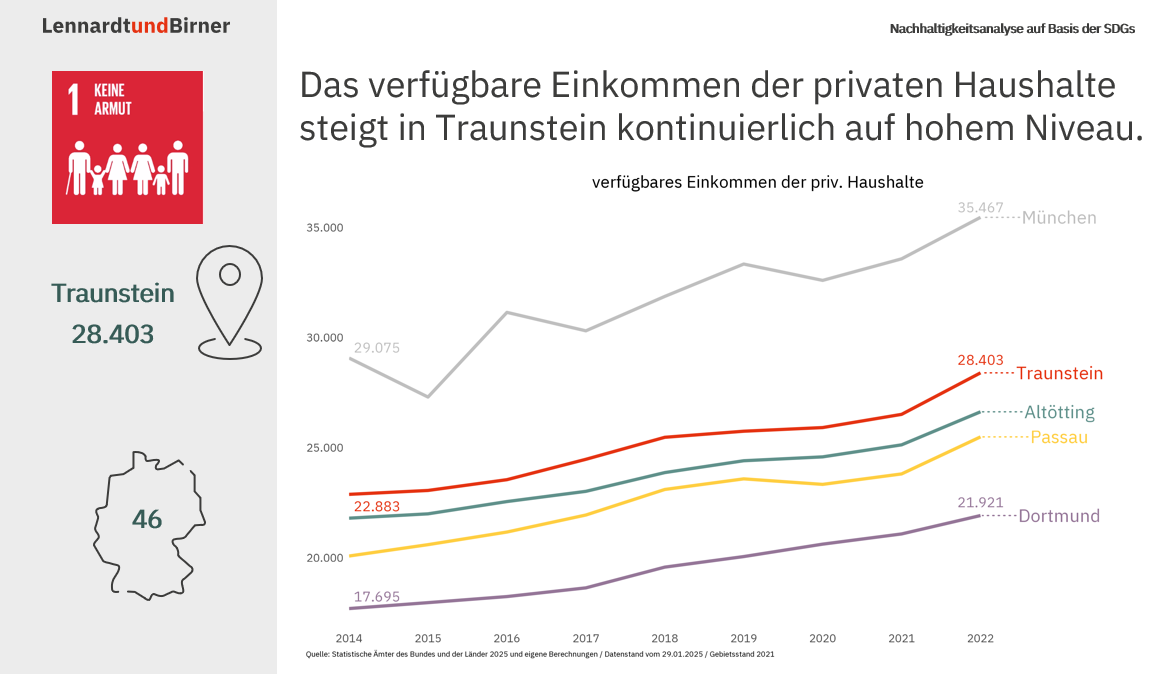
At the end there is a project name and a button. Out comes a ZIP: the presentation in the corporate design, plus the underlying data as an Excel file, one sheet per dataset and an overview sheet tracing every indicator back to the official statistic and its reference number. Optionally, a language model writes the slide titles.
The whole thing in a minute
From selection to finished presentation, in short.
Outcome
“The tool supporting our presentation work has considerably improved the efficiency of our analysis process. Our consultants can now concentrate on the analysis and the individual client advice that actually creates value, while time-consuming formatting and data preparation happen automatically in the background. Through the time saved on administrative tasks, the system had already paid for itself in the first year.”

Where it got tricky
Bundled locations cannot simply be added up
When someone bundles three neighbouring districts into one comparison location, the obvious move is to add or average the indicator values. For most indicators that is wrong: rates, shares, index series and per-capita figures do not aggregate linearly, and averaging across districts weights the smallest one the same as a major city. The right way is to aggregate one level down, at the underlying quantities, and recompute the indicator from those, using the grouping attributes of whichever official table it comes from. And that has to be done per indicator.
Data that comes from public authorities rather than an API
Official labour-market data suppresses small counts. At the level of individual economic subsectors within a district that is the normal case, and it hits exactly the sectors a structural analysis is about. Read the gaps as zero and you build a false structure; leave them empty and there are holes in the presentation. So “missing” and “is zero” have to stay distinguishable right through the calculation chain. On top of that, one module works from an export the user has to request from the agency themselves: header rows above the data, 41 columns, German number formats, placeholder characters, and row labels that encode a hierarchy and are spelled inconsistently. Without validation up front, the default outcome would be a crash deep inside rendering or, worse, a run that quietly produces wrong figures.
Technical implementation
The core is officer. Slides are written into the existing master through named
layouts and named placeholders rather than coordinates, so the client can revise their template
as long as the placeholder names stay. Tables go through flextable and come out as
real, editable PowerPoint tables.
With the charts, the effort goes into details that are unreliable by hand: labels that do not overlap, text inside bars, nested axes, annotation on maps. A German hyphenation dictionary is included, because long compound words cannot be broken at a space when there is no space. The house typeface has to be installed in the image, otherwise it is missing at render time.
Data is prepared separately from the app. At runtime the app reads prepared RDS files only and never queries a statistics database. All time series are reconciled onto one common territorial definition, which is printed as a source note on every slide, because territorial reforms otherwise silently distort any multi-year comparison.
AI is used in exactly one place. The model writes slide titles and nothing else. For each slide it gets the rendered chart as an image, the underlying dataset and a prompt with editorial rules, and returns exactly one title through a typed response schema. No tool access, no database, no state across slides. Figures, indicators, rankings and charts are produced entirely deterministically in R. The feature is optional and off by default; without it each slide carries a placeholder title.
Hosting and ongoing work
The application has been running since March 2023 and has grown from one analysis product to eight.
A push to main builds the image, pushes it to a private registry, pulls it onto the
target server and restarts the app. The app runs behind ShinyProxy with one container per user,
so a long computation affects nobody else. Login and user management sit in front of the app, in
the proxy. The R version and package versions are pinned, and the template and the typeface are
part of the image: same input, same output, whatever machine it runs on.
New data releases go through me. A data update is a commit, the deploy is the same as for a code change, and each tab shows which data release it is on. When something goes wrong in production, the user sees a message that makes sense. On a real bug I also get an email with the error text and the complete parameter set, so I can reproduce the case without having to ask the user.