Excel that keeps calculating instead of just showing figures
Purchasing pulls its order proposals straight out of the ERP with one click. What comes back is an Excel workbook with real formulas: change a quantity in the sheet and the coverage recalculates.
Starting point
Order planning ran on several exports out of the ERP that were merged by hand: item master, demand, open orders, stock on hand. Those went into a workbook where the buyer then worked out which items needed reordering and how long current stock would last.
That works, but it costs the same hour every time, and every step is a place where a column can slip.
Goal
The same figures and the same layout as before, just without the copying. What mattered to the department was that the output stays a real Excel workbook they keep working in, rather than a web interface that only displays results.
On top of that, a few fixed requirements from the business: the thresholds for coverage and the control ratio, one sheet per product group, and read-only access to the ERP.
Solution
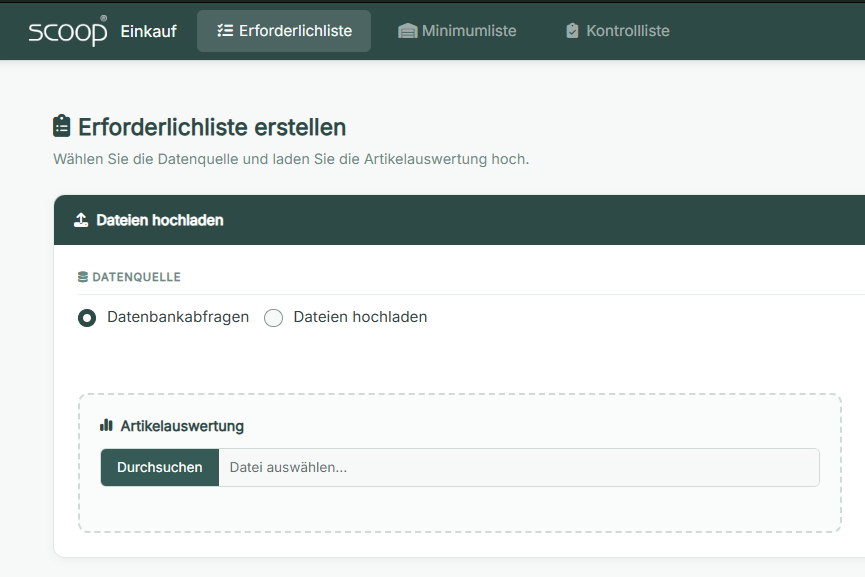
A web interface with three tabs, one per analysis. At the top the user picks the data source: either straight from the databases or, as a fallback, from uploaded files. Every uploaded file is checked immediately, and the generate button stays disabled while anything is missing. The message then names the column and the file, instead of the run failing halfway through.
After the click the app queries the databases, calculates, and builds the workbook: one sheet per product group, one main row per item with sub-rows beneath it for open orders and planned deliveries. The columns for coverage in months and the “lasts until” date are formulas, and the control column carries conditional formatting that turns red when things get tight.
Outcome
Where it got tricky
The output has to do its own calculating
Purchasing carries on working inside the generated file and wants to see how coverage and the “lasts until” date change when a quantity is adjusted. Writing finished numbers into it would be easy and worthless, because the first edit in the sheet makes them wrong. So the workbook needs real formulas, and those have to point at the rows and tables where they actually end up. That makes sorting, grouping and sheet layout inseparable from building the formulas: any later reordering breaks the references. Position and formula are therefore built together, before anything is written.
The delivery date is a free-text field
In the ERP this field contains whatever purchasing and the suppliers typed into it: full dates, dates without a year, calendar weeks in several spellings, and text like “before CNY”. Throwing a date parser at it does not help. It fails on one part and, worse, guesses the year on another. That is the dangerous case: around New Year a date without a year lands in the wrong year, and a long-overdue delivery shows up as a future one. On top of that the unparseable entry has to survive into the result, because purchasing can make use of it.
Goods already paid for but not yet arrived are invisible
For the question “what is still coming?”, the list of open orders is not enough. Goods that have been invoiced and paid but not yet booked into goods receipt drop out of the order view even though they have to be planned for. Naively added back in, they count twice. It took a second query across order, invoice and goods receipt, reconciling the quantities already received per line. Plus a requirement that is easy to miss: both analyses have to run against the same snapshot of the data, otherwise the overview and the detail sheet disagree.
Technical implementation
The key package here is openxlsx2. It is the only one of the
common Excel packages that can set formulas, named tables, conditional formatting, cell formats
and merged cells in a single pass, and on this project that is the product. Formula
columns are marked explicitly so Excel picks them up as formulas rather than text.
The three modules contain flow control only: validate, disable the button, handle errors. The domain logic sits beside them and is free of Shiny. That is why moving from file uploads to direct database queries barely touched the interface: every load function takes either a file path or a ready dataset, and in database mode the Excel-reading step is simply skipped. File mode stays in as the fallback for when the database is unreachable.
The queries are hand-written SQL over a connection pool, read-only. They mirror the ERP's own views and join order, invoice and goods receipt; in dplyr syntax that would stop being readable. The app itself is stateless: no database of its own, no session state, and the result is the downloaded file.
When something goes wrong the user sees a plain message saying support has been informed, and that actually happens: the app automatically sends a mail with the files involved attached. For an application whose inputs are a free-text field and four exports, that is worth more than a log file nobody reads.
Hosting and ongoing work
A push to main builds the image, puts it in a private registry and updates the
application on the server. It is served through ShinyProxy, which also handles the login in front
of it; the application runs in the container under its own user. Credentials come from
environment variables at runtime only.
The R version and package versions are pinned through renv, and the system packages
for the build are derived from the lockfile rather than listed by hand. For an application that
needs an ODBC driver, that is a noticeable difference.
There is no scheduler; everything runs on a click. One point stays deliberately open: the demand analysis still has to be uploaded on every run, even in database mode, because it is the one input that does not come from the ERP. That is the obvious next step.