An annual report that comes out of the run fully formatted
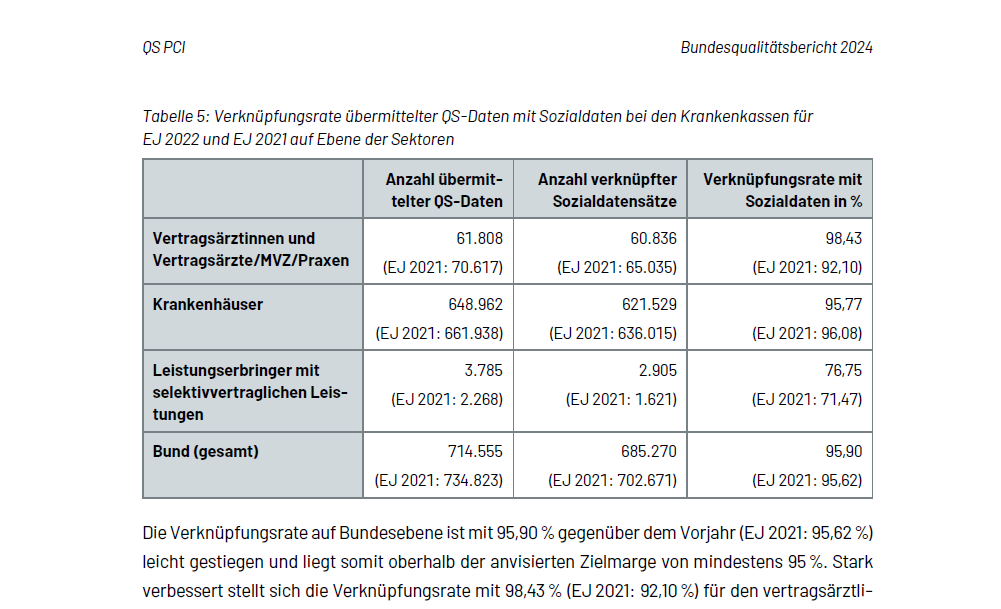
Around 2,000 tables, the charts and the prose in between are produced for the Bundesqualitätsbericht and the quality reports in a single run, in a layout that is not negotiable. The same figures also go out as an Excel workbook and, through an internal API, to other systems in-house.
Starting point
The Bundesqualitätsbericht, Germany's national healthcare quality report, is a substantial annual publication produced under a statutory mandate. What it looks like is settled in advance: a reporting concept fixes the tables and their numbering, and the corporate design sets the template, the house typeface, the named styles and the colour palette. Analysis, data preparation and the export to Word used to take a great deal of effort, and because much of it ran by hand, every reporting cycle picked up new mistakes.
Word is the binding target format here, and everything upstream is built around that: the individual pieces have to slot into one large document later, with cross-references and continuous numbering.
Goal
A solution that stays usable beyond the current report and into the years ahead: reproducible, easy to maintain, and written so that IQTIG staff can follow it and look after it themselves.
Solution
Rolling the report forward a year is one line at the top of the main script. From there the run pulls the data for every year in scope from the separate per-year databases, computes the reported figures, and builds all the tables and charts from them.
Out comes one Word document per table and per chart in the corporate design, plus a combined document in report order, an Excel workbook with the site-level results and a second sheet for incomplete submissions, and a prepared data file for the API.
The prose comes with it. The templates also write the sentences around the table, with the figures taken straight from the data instead of a placeholder someone replaces in Word later. That saves the rework and takes out the most common error along with it: the number in the text no longer matching the table.
Outcome
“The analyses, the data preparation and the Word export for the Bundesqualitätsbericht always took a great deal of effort. Building the entire pipeline in R takes work off the shoulders of IQTIG staff, considerably reduces the scope for error and, thanks to clear and straightforward programming logic, gives us a maintainable and durable solution for years to come. Many thanks, Stefan, for the professional work, always delivered on time, and for the friendly support along the way!”

Where it got tricky
The same table in Word and in Excel
The same tables that go to Word as formatted objects are also needed as a workbook, individually and stacked several to a sheet. A plain export writes only the raw values, and that loses exactly the parts that make the table readable: the header hierarchy, the group rows, what a percentage actually refers to. Building the Excel variant separately does not help either, because then there are two truths that drift apart the moment a rule changes. So the source is the already formatted object, and stacking several tables on one sheet means keeping a running tally of where the next one starts. That part is hand-built; there is nothing off the shelf for it.
A data model that shifts a little every year
Several years of data are always analysed side by side, and those data sets live in separate places and do not share a schema: columns were renamed, fields were added later, one year lives in a file rather than a database, at a different time resolution. There is no single query across all years, and mapping everything onto the newest schema fails because older years simply do not have some of the fields; those have to be derived from domain knowledge. The rulebook shifts with the schema, too: some requirements only apply from a given year, others may count as met through an exemption up to a cut-off date. The years still end up side by side in one table you can compare.
Technical implementation
Computing and formatting are separate. The table functions return values only, and the Rmd template
decides on headers, column widths, merged cells and captions. The Word output runs through
officedown and officer against the house reference template: the
templates call the named styles rather than formatting anything themselves, and set bookmarks for
the automatic numbering. flextable does the actual table work: multi-row headers,
group rows as subheadings, conditional formatting, and the page-break control that actually
matters once the report is printed.
One template is reused per module in a loop, and for the combined document the same templates are
embedded as child documents rather than written a second time. targets keeps track
of which input data has changed and recomputes only the affected targets. On a correction round
shortly before the deadline, that is the difference between a few minutes and starting over from
scratch.
Two of the charts are beyond what ggplot2 alone or Word by itself will do. The
overview across all sites has its interesting information at the edge, because almost every site
complies throughout; it is therefore assembled from several parts whose connection is computed
from the data. The flow diagram showing how the findings progress initially exists only in a
browser and comes out of a headless browser as a vector graphic, because a screenshot would have
the wrong resolution and the wrong typeface. showtext makes sure the house typeface
renders in the charts exactly as it does in the text.
The results for a given year also go to other systems in-house as JSON, through an API built with
plumber2. The API container reads only the data object the checked annual run
writes at the end, and has no database access of its own. So it cannot serve anything that has
not been through the checks.
Hosting and ongoing work
The annual run is started by hand. A new year means one more database connection and three more Excel inputs at the head of the main script. Those spots are commented, but it is a code change and not configuration.
The run is backed by two checks that test what the numbers say rather than individual functions.
After the build, figures that appear in more than one table are checked against each other, and
subtotals against the total; back comes a list of the modules that stand out. And before every
render, each table is checked for unexpected NAs or empty cells. There is a reason
those checks exist: transposed digits between two tables were a real problem.
Everything runs in-house, with no cloud services: internal databases, an internal API, the
organisation's own certificate chain inside the container. The R version and the package
versions are pinned through the base image and renv.
Development and the yearly adjustments are mine. Something shifts every year: a field is added, a rule only takes effect from a cut-off date, a module is renamed. The recurring part of the work is following that through without changing the previous years' results.